Author Archives: DSK Desk

About DSK Desk

India's Leading SuchnaPortal.Com : Instant guide for everyone

Click here to Apply for New PAN Card: Direct Procedure for NSDL PAN Registration

Rajasthan SSO ID Login Portal | Registration, Benefits, and Tutorial Guide

Rajasthan SSO ID Login Portal: The Definitive Guide (2025)

Your complete resource for SSO ID Registration, Benefits, SSO ID LOGIN, and Access to 150+ Government Services.

Official Portal: sso.rajasthan.gov.in

1. Understanding the Rajasthan SSO ID

The Rajasthan SSO ID (Single Sign-On ID) is a mandatory, unique digital identity established by the Government of Rajasthan. Its core objective is to centralize and simplify citizen access to government schemes, job portals, and various private services. By requiring only one login, the SSO ID eliminates the need for multiple usernames and passwords, creating a truly seamless digital experience.

Core Benefits of Using SSO ID LOGIN

Centralized Portal Access

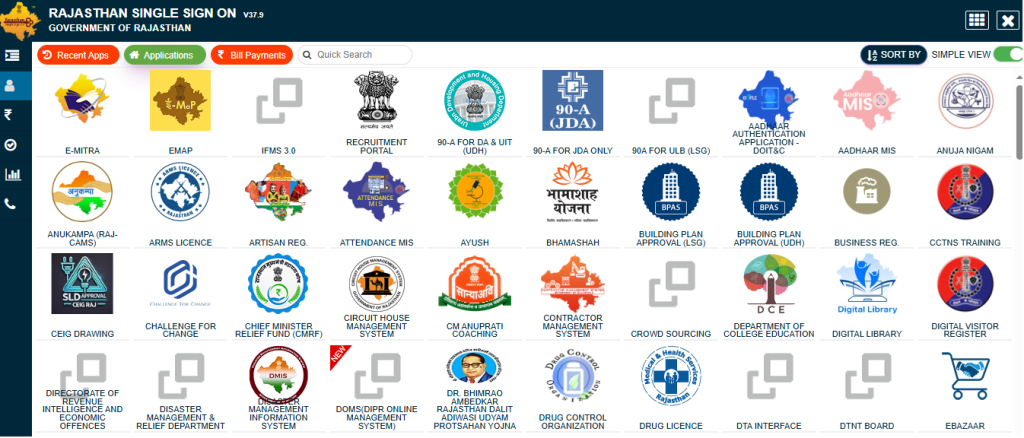
Access to over 150+ government and private services—everything from job applications to utility payments—using one single set of credentials.

Completely Free and Secure

Creating and using your SSO ID is completely free for all eligible users. The platform ensures data security and profile integrity.

Time Efficiency

Significantly reduces paperwork and the time spent visiting government offices, bringing services directly to the citizen’s home.

Profile Upgrades

You can log in and update your profile information anytime, ensuring your digital identity remains accurate for all services.

2. Step-by-Step SSO ID Registration Tutorial

The process to create your Rajasthan SSO ID is mandatory for Rajasthan residents, registered businesses, and government employees. The required identity proof differs based on your category.

2.1. Registration for Citizens (using Jan Aadhaar)

  1. Visit the official SSO portal and click the “Registration” button.
  2. Select the “Citizen” tab and choose “Jan Aadhaar” as the registration method.
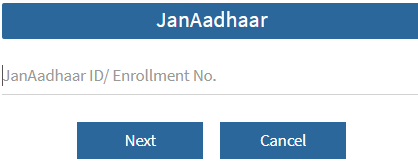
  3. Enter your Jan Aadhaar Card number and proceed to verify.
  4. Select your name from the family list. An OTP will be sent to the registered mobile number for verification.
  5. Enter the OTP, then create a strong, unique SSO ID username and a new password.
  6. Provide your mobile number and email ID, and click “Register” to complete your SSO ID creation.

2.2. Registration for Udyog (Industry/Business)

  1. On the SSO portal registration page, select the “Udyog” tab.
  2. Use your Business Register Number (BRN) to initiate the registration.
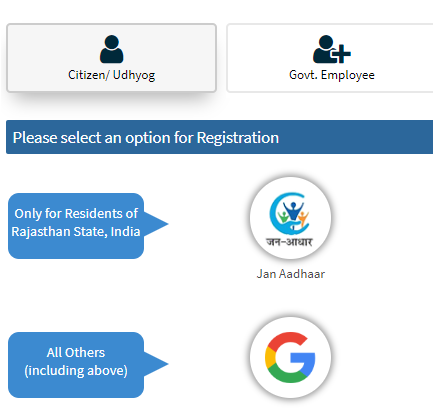
  3. The system will automatically fetch your business details from government records. Verify this information.
  4. Create your unique SSO ID username and a strong password for the business account.
  5. Provide the registered business mobile number and email address.
  6. Click “Register” to finalize the business SSO ID.

2.3. Registration for Government Employees

  1. On the SSO portal registration page, select the “Govt. Employee” tab.
  2. Choose the “SIPF” (State Insurance and Provident Fund) option.
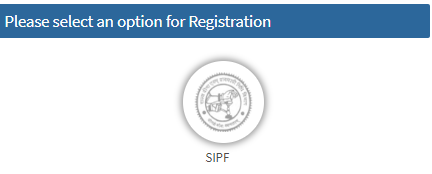
  3. Enter your SIPF number and the password linked to your existing SIPF account for authentication.
  4. Your official employee details will be loaded. Your employee ID will typically be used as your SSO ID.
  5. Set a new, strong password, confirm your mobile number, and complete the registration process.

3. What Can You Do with Your SSO ID? (150+ Services)

Your SSO ID is the master key to a universe of digital services. It allows access to more than 150+ government and citizen services, making it essential for every digital task in Rajasthan. Key service categories include:

Recruitment & Job Services

Application for all government jobs, checking results, and managing exam portals like RPSC/RSSMB. (e.g., *Rajasthan Government Job Portal Login*)

Citizen Welfare & Schemes

Access to schemes, pension applications, Bhamashah, and other social welfare benefits management.

Business & Industry (Udyog)

Business registration, application for licenses, compliance filings, and related services for entrepreneurs.

Education & University

Admission processes, scholarship applications, and access to state-run educational portals for students.

Utility & Document Services

Payment of utility bills, document verification, and updating personal records (like Jan Aadhaar details).

E-Mitra & Digitization

Access to E-Mitra services and other digitalization initiatives of the government.

4. SSO ID LOGIN and Credential Recovery

Follow these steps for a successful SSO ID LOGIN or to recover your account credentials easily from the official portal.

4.1. Standard SSO ID LOGIN

The primary login process is straightforward:

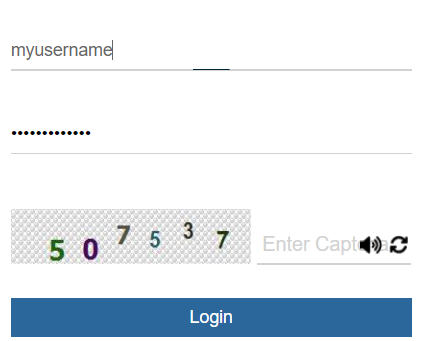
  1. Visit the official SSO portal.
  2. Enter your SSO ID (Digital Identity) in the first field.
  3. Enter your corresponding password.
  4. Type the Captcha code shown.
  5. Click the “Login” button to proceed.

4.2. Forgot Your SSO ID?

To recover your SSO ID, click “I Forgot my Digital Identity (SSOID)” on the login page.

  • You will be directed to the recovery page.
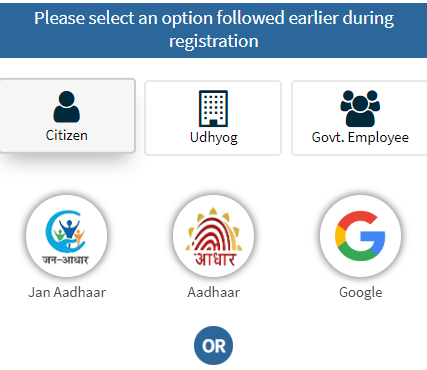
  • Recover using Jan Aadhaar details.
  • Recover using your registered Mobile Number.
  • Your SSO ID will be sent to your registered mobile number via SMS.

4.3. Resetting SSO ID Password

Click “I Forgot my Password” on the login page.

  • Enter your SSO ID and Captcha.
  • Verify identity via Mobile, Email, or Aadhaar (choose one).
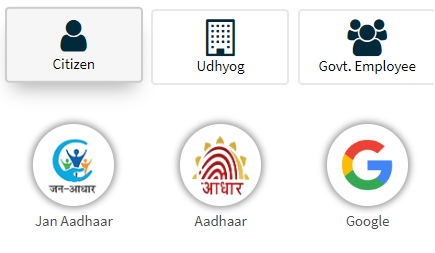
  • Enter the OTP sent.
  • Set a new, strong password.

Conclusion: The Power of Rajasthan SSO ID

The Rajasthan SSO ID is the cornerstone of digital governance in the state. By centralizing access for citizens, Udyog, and employees, it ensures a seamless transition to online service delivery. Whether your need is SSO ID LOGIN for a job application or learning SSO ID Registration steps, this guide provides the precise information needed to harness the full potential of your digital identity.

SSO ID Rajasthan: Your Digital Key to Governance

Disclaimer: This website, suchnaportal.com, is an independent platform created to share information about the **SSO Portal Rajasthan** in a simple, easy-to-understand way. Digital Suchna Kendra is an independent tutorial hub.

© 2025 SuchnaPortal.com. All Rights Reserved. Dedicated to publishing free tutorials for everyone

Click here to Apply for New PAN Card. Applying for a new Permanent Account Number (New PAN Card) is essential for financial transactions, tax filing, and identity verification in India. Whether you’re an individual, a business entity, or a non-resident, the process involves specific steps through income tax department india official portals. Digital Suchna Portal compiles essential details on how to apply for New Pan Card, steps to fill form 8, eligibility, required documents, application methods, fees, and more to help you navigate the PAN procedure instantly.

Income Tax Department New PAN Card

A PAN Card serves as a unique 10-digit alphanumeric identifier issued by the Income Tax Department. It’s mandatory for activities like opening bank accounts, filing income returns (ITR), and high-value transactions. Even if you don’t have taxable income, having one simplifies various indian government official processes.

Eligibility for a New PAN Card

Anyone can Instantly apply for New PAN Card using Digital Suchna Portal, including:

  • Indian citizens (adults, minors, and students).
  • Non-Resident Indians (NRIs), Persons of Indian Origin (PIO), and Overseas Citizens of India (OCI).
  • Foreign nationals residing in India.
  • Entities like companies, firms, Hindu Undivided Families (HUFs), trusts, and associations.

Minors must apply through parents or guardians. Corporates often get PAN Card automatically during registration, but individuals and others need to apply separately.

Required Forms for New PAN Application / Registration

  • Form 49A: Used by Indian citizens, NRIs, PIOs, OCIs, and Indian entities.
  • Form 49AA: For foreign citizens and entities.

Select the appropriate form based on your citizenship, condition and location to procedure for pan card registration.

Documents Required for PAN Card Application

You have must these proofs before starting to fill pan card application:

Dear customer, please check your name, dob, address, parents details in your documents before applying

Proof of Identity (POI)

  • Aadhaar card
  • Voter ID
  • Passport
  • Driving license
  • Ration card with photo
  • Arm’s license
  • Government-issued photo ID
  • Pensioner card with photo
  • Bank certificate with photo and account details

For entities like companies: Registration certificate from the Registrar.

Proof of Address (POA)

  • Aadhaar card
  • Utility bills (electricity, water, gas, landline – not older than 3 months)
  • Bank or credit card statements (recent)
  • Passport or spouse’s passport
  • Voter ID or driving license
  • Property tax order or registration document
  • Domicile certificate
  • Employer certificate

For NRIs: Recent bank statement from country of residence or NRE account.

Proof of Date of Birth (PODB) – For Individuals and HUF Karta

  • Birth certificate
  • Matriculation mark sheet
  • Passport
  • Driving license
  • Aadhaar card
  • Marriage certificate
  • Pension order
  • Affidavit before a magistrate

For HUFs: Affidavit from the Karta listing coparceners.

For minors: Use parent’s documents. For foreigners: Attested copies of passport, PIO/OCI card, or citizenship ID.

Ensure documents are clear and match application details. Upload sizes for online: Photos (3.5×2.5 cm, <50KB), signatures (2×4.5 cm, <50KB), PDFs (<300KB).

Step-by-Step Guide to Apply for a New PAN Card Online

Online applications are convenient and can be done via authorized portals like Protean (NSDL), UTIITSL, or the Income Tax e-Filing site.

Through Protean (NSDL) Portal

  1. Visit the official site and select “New PAN” for Indian or foreign citizens.
  2. Choose category (individual, HUF, etc.) and fill basic details like name, DOB, email, mobile.
  3. Generate a token number and continue to full form.
  4. Select verification mode: e-KYC (Aadhaar-based), e-Sign, or physical documents.
  5. Enter income source, address, AO code (find via search tool), and upload proofs.
  6. Review, pay fees, and authenticate with Aadhaar OTP.
  7. Get 15-digit acknowledgment; send physical docs if chosen to the Pune address within 15 days.

Through UTIITSL Portal

  1. Go to the site, pick “New PAN Card” and Form 49A/49AA.
  2. Choose digital (e-Sign) or physical mode.
  3. Fill personal, contact, and document details.
  4. Pay online or via draft; get acknowledgment.
  5. For physical: Print, sign, attach docs, and mail to nearest office (Mumbai, Kolkata, etc.).
  6. Use Aadhaar OTP for e-verification if eligible.

Instant e-PAN via Income Tax Portal

For quick digital issuance (free for eligible individuals):

  1. Access the e-Filing portal and click “Instant e-PAN.”
  2. Enter Aadhaar number, confirm details, and validate with OTP on linked mobile.
  3. Submit; get acknowledgment.
  4. Download e-PAN in minutes (valid digitally; physical card needs separate request).

This is for adults with valid Aadhaar, no prior PAN, and not representatives.

How to Apply Offline for a New PAN Card

  1. Download Form 49A/49AA from official sites or get from PAN centers.
  2. Fill details, attach photos, signature, and proofs.
  3. Submit at nearest TIN-FC, NSDL/UTIITSL office, or authorized agent with fees.
  4. Receive acknowledgment for tracking.

Offline suits those without internet or preferring in-person submission.

PAN Card Application Fees

Fees depend on mode and delivery:

  • Indian address (physical card): ₹93 to ₹107 (plus GST).
  • Foreign address: ₹864 to ₹1,017 (plus GST).
  • Paperless (e-PAN email): ₹66 to ₹72.
  • Instant e-PAN: Free.

Pay via card, net banking, or draft. No processing without payment and docs.

Processing Time for PAN Card

  • Instant e-PAN: 10 minutes to 2 days.
  • Standard applications: 15-20 days for verification and dispatch.
  • Up to 45 days in some cases.

Track status using acknowledgment number on portals.

Special Cases in PAN Applications

For NRIs/PIO/OCIs

Use Form 49A/49AA. Higher fees for foreign delivery. Provide overseas bank statements for address. Apply online; consulates like New York or San Francisco guide but don’t issue cards.

For Minors

Parents/guardians apply using Form 49A. Use child’s details with parent’s proofs. Father’s name mandatory; mother’s from May 2024. Not eligible for instant e-PAN.

For Foreigners

Form 49AA required. Attest docs via apostille or embassy. Higher fees for international dispatch.

For HUFs and Entities

Karta applies for HUF with coparcener affidavit. Companies/firms submit registration proofs.

Tips for Successful PAN Application

  • Link Aadhaar for e-verification; unlinked PAN may lead to penalties.
  • Avoid abbreviations in names; use English only.
  • Sign within boxes; left thumb impression needs attestation.
  • Choose office address communication only with both residence and office proofs.
  • Save drafts to edit before submission.
  • Track via portals; reprint if needed (extra fee).
  • Don’t apply if you already have a PAN; use correction form instead.

For NRIs in USA, check consulate sites for additional guidance.

This process ensures compliance with Income Tax rules. Start your application today through official channels for hassle-free approval. If issues arise, contact helplines or visit PAN centers.

Passport Seva India Portal पर घर बैठे Online Apply करें Tatkaal Passport, Appointment, Renewal, Status Check और Documents की पूरी जानकारी

Passport Seva India भारत सरकार के Ministry of External Affairs द्वारा संचालित एक डिजिटल प्लेटफ़ॉर्म है जो पासपोर्ट सेवाओं को तेज, पारदर्शी और उपयोगकर्ता-अनुकूल बनाने के लिए बनाया गया है। पहले पासपोर्ट के लिए लंबी कतारों में लगना और कई बार ऑफिस के चक्कर लगाना पड़ता था, लेकिन अब Passport Seva Portal के ज़रिए हर भारतीय नागरिक घर बैठे Passport Online Apply कर सकता है। इस पोर्टल पर आप Fresh Passport, Renewal (Reissue), Duplicate Passport, Police Clearance Certificate (PCC), और Tatkaal Passport तक के लिए आवेदन कर सकते हैं। पोर्टल पर यूज़र को step-by-step process मिलता है – Registration, Form Filling, Online Payment, Appointment Booking और Application Tracking – जिससे पूरी प्रक्रिया आसान और तेज़ हो जाती है।

Passport Seva India – All Official Useful Links

🎯 Eligibility – कौन-कौन Apply कर सकता है?

भारत का कोई भी नागरिक जो यात्रा, पढ़ाई, नौकरी या विदेश में रहने के लिए पासपोर्ट चाहता है, वह Passport Seva India Portal के माध्यम से आवेदन कर सकता है। Fresh Passport उन लोगों के लिए है जिन्होंने कभी पासपोर्ट नहीं बनवाया, जबकि Reissue Passport पुराने पासपोर्ट की expiry, damage या pages खत्म होने पर करवाया जाता है। Minor (18 साल से कम) applicants के लिए माता-पिता या Guardian की सहमति आवश्यक है। Senior Citizens को कुछ विशेष छूट मिलती है। ECR (Emigration Check Required) और Non-ECR categories के लिए दस्तावेज़ों की सूची अलग होती है, जो पोर्टल पर उपलब्ध है।

📄 Required Documents for Passport Seva

पासपोर्ट आवेदन के लिए सही दस्तावेज़ होना बेहद ज़रूरी है। Fresh Passport के लिए Proof of Date of Birth (Birth Certificate, Matriculation Certificate, PAN Card), Address Proof (Aadhaar Card, Voter ID, Electricity Bill, Rent Agreement) और Identity Proof की आवश्यकता होती है। Reissue Passport के लिए पुराने पासपोर्ट की फोटोकॉपी और Address Proof ज़रूरी है। Minor applicants के लिए माता-पिता का Passport या पहचान पत्र और सहमति पत्र अनिवार्य है। Tatkaal Passport के लिए Annexure F या Verification Certificate भी लगाना पड़ सकता है।

🌐 Passport Online Apply Process (Step-by-Step)

Passport Seva Portal पर आवेदन करने की प्रक्रिया बिल्कुल आसान है। सबसे पहले Passport Seva India Portal पर जाकर “Register Now” पर क्लिक करके एक नया खाता बनाएं। फिर Login करके “Apply for Fresh Passport / Reissue” विकल्प चुनें। अब Online Form भरें या XML file upload करें। सभी जरूरी जानकारी जैसे नाम, जन्मतिथि, पता, माता-पिता का नाम सही-सही भरें। Form submit करने के बाद “Pay and Schedule Appointment” पर क्लिक करके फीस का भुगतान करें। Payment के बाद आपको पास के Passport Seva Kendra (PSK) या Post Office Passport Seva Kendra में Appointment Book करना होगा। तय समय पर Original Documents के साथ पहुंचकर बायोमेट्रिक और फोटो खिंचवाएं।

🚀 Tatkaal Passport – जब पासपोर्ट जल्दी चाहिए

अगर आपको पासपोर्ट तुरंत चाहिए, तो Tatkaal Passport Apply सबसे अच्छा विकल्प है। इस प्रक्रिया में Verification तेजी से होता है और Passport सामान्यतः 1-3 कार्य दिवसों में जारी कर दिया जाता है। Police Verification बाद में हो सकता है (post-issue verification)। Tatkaal Passport के लिए अतिरिक्त शुल्क लगता है और कभी-कभी Annexure F की आवश्यकता पड़ती है।

📊 Passport Fees (As per Passport Seva Fee Calculator)

Passport Seva Portal पर Fee Calculator टूल उपलब्ध है। उदाहरण के लिए:

  • 36 पेज वाला Normal Passport (10 साल वैधता) – ₹1500
  • 60 पेज वाला Normal Passport – ₹2000
  • Minor Passport – ₹1000
    Tatkaal सेवाओं के लिए लगभग ₹2000 अतिरिक्त शुल्क लगता है। Payment के लिए Debit/Credit Card, Net Banking, UPI और SBI Challan जैसे विकल्प उपलब्ध हैं।

🔍 Passport Status Check & Tracking

Application submit करने के बाद आप Passport Status Check आसानी से कर सकते हैं। Status Tracker पर जाकर Application Reference Number (ARN) डालें और अपने आवेदन की स्थिति देखें। आपको SMS और Email द्वारा भी अपडेट मिलता रहेगा।

🏢 Passport Seva Kendra (PSK) & POPSK

भारत में 90 से ज्यादा Passport Seva Kendras और 400+ Post Office Passport Seva Kendras (POPSK) हैं। Appointment Availability Status को आप Portal पर Live देख सकते हैं और निकटतम PSK चुन सकते हैं। यह सुविधा पूरे देश में पासपोर्ट सेवाओं की पहुंच को आसान बनाती है।

🗞 Latest Updates & News

Passport Seva India Portal पर समय-समय पर maintenance अपडेट आते हैं, जिससे सेवाएँ थोड़े समय के लिए बंद हो सकती हैं। हाल ही में सरकार ने Chip-Enabled e-Passport जारी करने की प्रक्रिया शुरू कर दी है जो ज्यादा सुरक्षित और International Standards के अनुरूप है। इसके अलावा कई शहरों में Mobile Passport Camps का आयोजन किया जा रहा है ताकि दूर-दराज क्षेत्रों के लोग भी आसानी से पासपोर्ट बनवा सकें।

🏁 Final Words

Passport Seva India ने पासपोर्ट बनाने की प्रक्रिया को पूरी तरह डिजिटल बना दिया है। अब आपको बार-बार सरकारी दफ्तरों के चक्कर लगाने की जरूरत नहीं है। सही जानकारी और दस्तावेज़ों के साथ आप घर बैठे Passport Online Apply कर सकते हैं, Tatkaal Passport के लिए तेज़ प्रक्रिया का लाभ उठा सकते हैं और Application का Status Check कर सकते हैं। यह प्लेटफॉर्म न केवल समय बचाता है बल्कि पूरी प्रक्रिया को पारदर्शी और सुरक्षित भी बनाता है।

[todayliveblog]

Rajasthan Income Certificate Online Apply: How to Apply, Documents, Status & Download (घर बैठे)

Rajasthan Income Certificate (आय प्रमाणपत्र) एक सरकारी दस्तावेज़ है जो आपके परिवार की वार्षिक आय को प्रमाणित करता है। यह प्रमाणपत्र सरकारी योजनाओं (Government Schemes), छात्रवृत्तियों (Scholarships), EWS Reservation (10% कोटा), स्कूल/कॉलेज फीस रियायत (Fee Concession) और अन्य सरकारी लाभ (Government Benefits) लेने के लिए आवश्यक होता है। राजस्थान सरकार ने इस प्रक्रिया को आसान बनाने के लिए SSO Rajasthan Portal और e-Mitra Online Apply Service शुरू की है। अब आप घर बैठे ऑनलाइन आवेदन कर सकते हैं, स्टेटस चेक कर सकते हैं और प्रमाणपत्र डाउनलोड भी कर सकते हैं।

📌 Rajasthan Income Certificate Importance

  • Scholarship: सरकारी और प्राइवेट संस्थानों में दी जाने वाली कई छात्रवृत्तियाँ (scholarships) केवल उन्हीं छात्रों को मिलती हैं जिनकी पारिवारिक आय एक निश्चित सीमा से कम है।
  • EWS / Reservation: EWS category में 10% आरक्षण पाने के लिए Income Certificate आवश्यक है।
  • Subsidy & Yojana Benefits: सरकारी आवास योजना, गैस सब्सिडी, फ्री बिजली कनेक्शन योजना, किसान योजनाएँ आदि का लाभ लेने के लिए।
  • Fee Concession: कॉलेज और स्कूल में फीस माफी / रियायत के लिए।
  • Medical Treatment: कुछ सरकारी हॉस्पिटल में मुफ्त या रियायती इलाज के लिए।

✅ Eligibility | कौन आवेदन कर सकता है

  • राजस्थान का स्थायी निवासी होना अनिवार्य है।
  • छात्र, किसान, व्यवसायी, स्वरोजगार करने वाले, सरकारी कर्मचारी या पेंशनधारी सभी आवेदन कर सकते हैं।
  • परिवार की कुल वार्षिक आय प्रमाणित करने के लिए दस्तावेज़ उपलब्ध होने चाहिए।

📝 Required Documents | जरूरी दस्तावेज़

  • Identity Proof: Aadhaar Card, Voter ID, PAN Card
  • Address Proof: Ration Card, Utility Bill, Rent Agreement
  • Income Proof: Salary Slip, Income Tax Return, Employer Certificate, Affidavit
  • Other: पासपोर्ट साइज फोटो, Self-Declaration Form (अगर मांगा जाए)

🌐 Rajasthan Income Certificate Online Apply Process

  1. Visit Official Website: emitra.rajasthan.gov.in या SSO Rajasthan पोर्टल खोलें।
  2. Login/Register: यदि नया यूज़र हैं तो SSO ID बनाएं।
  3. Select Service: e-Mitra dashboard से “Rajasthan Income Certificate” सेवा चुनें।
  4. Fill Application: फॉर्म में व्यक्तिगत जानकारी, पता, परिवार के सदस्यों की जानकारी, आय का विवरण भरें।
  5. Upload Documents: सभी दस्तावेज़ स्कैन कर अपलोड करें।
  6. Pay Fees: अगर शुल्क लागू है तो ऑनलाइन पेमेंट करें।
  7. Submit Application: फॉर्म सबमिट करें और Application ID नोट करें।

🏢 Offline Process | ऑफलाइन तरीका

  • नजदीकी e-Mitra केंद्र या तहसील कार्यालय जाएं।
  • वहां से Rajasthan Income Certificate Application Form प्राप्त करें।
  • फॉर्म भरकर आवश्यक दस्तावेज़ लगाएं और जमा करें।
  • रसीद प्राप्त करें और समय-समय पर स्टेटस चेक करें।

🔍 Rajasthan Income Certificate Status Check, Download & Verification

  • SSO Rajasthan में लॉगिन कर के Application Status चेक करें।
  • Approval के बाद e-Mitra पोर्टल से Download PDF करके प्रिंट ले सकते हैं।
  • Verification के लिए Certificate Number डालकर Authenticity चेक कर सकते हैं।

🕒 Processing Time & Fees

  • सामान्यत: 7 से 15 दिन में Income Certificate जारी हो जाता है।
  • शुल्क ₹10-₹50 के बीच हो सकता है (जिला / पंचायत के हिसाब से अलग)।

🎯 Income Certificate Rajasthan के फायदे

  • सभी सरकारी योजनाओं में पात्रता साबित करने के लिए आवश्यक।
  • छात्रवृत्ति और सरकारी नौकरी में EWS कोटा का लाभ मिलता है।
  • बैंक लोन, एजुकेशन लोन, हॉस्पिटल उपचार में भी उपयोगी।
  • सामाजिक सुरक्षा योजनाओं में पंजीकरण के लिए ज़रूरी।

❓ FAQs | अक्सर पूछे जाने वाले प्रश्न

Q1: Rajasthan Income Certificate कितने समय के लिए वैध होता है?
A: आमतौर पर 1 साल के लिए वैध होता है।

Q2: क्या बिना Aadhaar Card के Income Certificate बन सकता है?
A: हाँ, लेकिन Aadhaar देना सुविधाजनक और जल्दी प्रोसेस होने के लिए ज़रूरी है।

Q3: e-Mitra से ऑनलाइन बनाने में कितना समय लगता है?
A: सभी दस्तावेज़ सही होने पर 7-15 दिन के भीतर बन जाता है।

Q4: क्या Student अपने नाम से Apply कर सकता है?
A: हाँ, छात्र अपने परिवार की आय प्रमाणित करने के लिए स्वयं आवेदन कर सकते हैं।

Category-wise Rajasthan Income Certificate Types

1️⃣ General Purpose Income Certificate

  • उपयोग: सरकारी योजनाओं, सब्सिडी, लोन, हॉस्पिटल ट्रीटमेंट, राशन कार्ड में रियायत।
  • Apply Mode: e-Mitra / SSO Rajasthan से Online Apply।
  • दस्तावेज़: Aadhaar, Address Proof, Income Proof (Form 16, Salary Slip), Passport Photo।

2️⃣ EWS Income Certificate (10% Reservation)

  • उपयोग: सरकारी नौकरी, कॉलेज एडमिशन, प्रतियोगी परीक्षा में EWS कोटा का लाभ।
  • Eligibility:
    • परिवार की वार्षिक आय ₹8 लाख से कम।
    • परिवार के पास 5 एकड़ से कम कृषि भूमि।
    • 1000 sq ft से छोटा घर और 100 sq yard से छोटा residential plot (नगर निगम सीमा में)।
  • दस्तावेज़:
    • Income Proof, Property Details, Self-Declaration, Aadhaar, Address Proof।

3️⃣ Student / Scholarship Income Certificate

  • उपयोग: Pre-Matric, Post-Matric Scholarships, Fees Concession।
  • Apply Mode: e-Mitra से Online या स्कूल/कॉलेज के माध्यम से Offline।
  • दस्तावेज़:
    • Student ID, Aadhaar, School Certificate, Parent Income Proof।

4️⃣ BPL / आर्थिक रूप से कमजोर परिवार (Below Poverty Line) Certificate

  • उपयोग: मुफ्त राशन, सरकारी सहायता, उज्ज्वला योजना, आयुष्मान भारत।
  • Eligibility: State BPL List में नाम होना चाहिए।
  • Apply Mode: पंचायत / तहसील स्तर पर आवेदन।
  • दस्तावेज़: Ration Card, Aadhaar, आय विवरण।

5️⃣ Farmer / Agriculture Subsidy Income Certificate

  • उपयोग: किसान योजनाएँ, PM-Kisan Samman Nidhi, कृषि उपकरण सब्सिडी।
  • Apply Mode: कृषि विभाग / e-Mitra के माध्यम से।
  • दस्तावेज़:
    • Khasra-Khatauni, Aadhaar, Bank Passbook, Income Proof।

📝 Documents Checklist (सभी Categories के लिए Common)

  • Aadhaar Card (Identity Proof)
  • Address Proof (Ration Card, Utility Bill, Voter ID)
  • Income Proof (Salary Slip, ITR, Employer Certificate)
  • Affidavit (अगर Self-Declaration ज़रूरी हो)
  • Passport Size Photo

🌐 Rajasthan Income Certificate Online Apply Process

  1. SSO Rajasthan Portal पर Login/Register करें।
  2. Dashboard में e-Mitra Services खोलें और “Income Certificate” चुनें।
  3. सही Category चुनें (General, EWS, Scholarship, Farmer)।
  4. सभी विवरण सही से भरें और दस्तावेज़ अपलोड करें।
  5. Application Fee Pay करें।
  6. Submit करें और Application ID सुरक्षित रखें।

📊 Processing Time & Fee

CategoryProcessing TimeFee (Approx)
General Income Certificate7-10 दिन₹10-₹30
EWS Income Certificate10-15 दिन₹30-₹50
Scholarship Certificate5-7 दिन₹10
BPL/Antyodaya Verificationपंचायत समय पर निर्भरFree / Nominal
Farmer Certificate7-15 दिन₹20-₹30

Digital SSO ID Rajasthan: Process to SSO Login, Registration, Forget Password Recover at sso.rajasthan.gov.in (Citizens Handbook)

Are you a resident of Rajasthan looking to access a wide range of government services online? The Rajasthan Single Sign-On (Digital SSO ID) portal is your one-stop solution. This innovative platform simplifies interactions with various state departments, offering a seamless and secure experience. From utility bill payments to job applications and accessing educational resources, Digital SSO ID Rajasthan brings all essential services under a single, unified digital roof.

What is Rajasthan Digital SSO ID?

Your Digital SSO ID is a unique digital identity assigned to every citizen, government employee, and business in Rajasthan. Think of it as your universal key to unlock countless government services without the hassle of remembering multiple usernames and passwords. This Rajasthan Single Sign-On system ensures convenience and enhanced security for all users.

Key Features & Benefits of Digital SSO Rajasthan

  • Unified Access: Log in once and access over 100 government applications and services.
  • Time-Saving: Eliminates the need for separate registrations and logins for different departments.
  • Enhanced Security: A centralized system with robust security measures to protect user data.
  • Personalized Dashboard: A customized view of services relevant to your profile.
  • Digital Wallet Integration: Often linked with e-wallets for easy payment of fees and charges.
  • Accessibility: Designed to be user-friendly, supporting various devices and internet speeds.

How to Get Your Digital SSO ID: Getting your Digital SSO ID is a straightforward process. Follow these simple steps for SSO Registration:

Total Time: 1 minute

Visit the Official Portal

 Navigate to the official Rajasthan SSO website and

Choose Registration Type

Citizen: You can register using your Jan Aadhaar, Bhamashah ID, Aadhaar ID, Facebook, or Google account.
Industry: Register using your Udyog Aadhaar or Business Register Number (BRN).
Government Employee: Use your SIPF number.

Fill in Details

 Provide the required information accurately. Ensure all mandatory fields are completed.

Create Password

Choose a strong, memorable password for your account.

Verify & Submit

 Review your details, verify with an OTP (if required), and submit.

Digital SSO Login: Accessing Your Digital Services

After successful registration, accessing your services is easy. Here’s how to perform Rajasthan Digital SSO Login:

  1. Go to the SSO Portal: Open the official Rajasthan SSO website.
  2. Enter Credentials: Input your Digital SSO ID and the password you created during registration.
  3. Captcha Verification: Enter the displayed captcha code for security purposes.
  4. Click Login: Hit the “Login” button to access your personalized dashboard.

What if You Forget Your SSO ID or Password? Digital SSO Forget Password

It’s common to forget login details. The SSO Rajasthan portal provides an easy recovery process if you need to perform a Digital SSO Forget Password action or retrieve your ID:

To Retrieve Your Digital SSO ID:

  • On the login page, look for the “Forget SSO ID” or “Forgot Username” option.
  • You might be asked to provide your registered mobile number, email address, or Aadhaar number.
  • Follow the on-screen instructions to receive your SSO ID via SMS or email.

To Reset Your SSO Password:

  • Click on the “Forget Password” link on the SSO Login page.
  • You will be prompted to enter your Digital SSO ID.
  • Choose a verification method (e.g., through registered mobile number, email, or Aadhaar OTP).
  • Enter the OTP received and set a new, strong password for your account.

Essential Services Accessible via Rajasthan Digital SSO

The Rajasthan Single Sign-On platform offers a comprehensive suite of services, including but not limited to:

  • e-Mitra Services: Utility bill payments, certificate applications (domicile, caste, etc.).
  • Job Applications: Access to various state government job portals and application forms.
  • Education: Scholarship applications, university admissions, and examination services.
  • Health: Online appointments, health scheme information.
  • Land Records: Access to ‘Apna Khata’ for land record details.
  • Pension Services: Status checks and application for various pension schemes.
  • Business & Industry: Licenses, registrations, and compliance services.
  • Jan Soochna Portal: Access to public information on government schemes.

Frequently Asked Questions (FAQs)

Q1: Is Digital SSO ID mandatory for all government services in Rajasthan?

A1: While not strictly mandatory for all services, an Digital SSO ID significantly streamlines access to the majority of digital government services, making your interaction much easier.

Q2: Can I link my Aadhaar card to my SSO ID?

A2: Yes, linking your Aadhaar card to your SSO ID is highly recommended as it enhances security and simplifies identity verification for many services.

Q3: Is there a mobile app for Rajasthan Digital SSO?

A3: The Rajasthan SSO portal is typically accessible via web browsers on mobile devices. Some specific department apps might integrate with SSOID, but the primary access is through the official website.

Q4: What should I do if I encounter an issue during SSO Registration or Login?

A4: You can contact the Rajasthan SSO helpdesk for support. Their contact details are usually available on the official SSO portal.

Stay Connected with Digital Rajasthan!

The Rajasthan SSO portal is a testament to the state’s commitment to digital governance. By embracing your Digital SSO ID, you step into a world of convenience, transparency, and efficient public service delivery. Make the most of this powerful platform to manage your civic duties and access essential services with ease.

[todayliveblog]

SSC CGL Admit Card 2025: टियर-1 परीक्षा के लिए एडमिट कार्ड जारी, यहां देखें डाउनलोड लिंक

नई दिल्ली: SSC CGL Admit Card 2025: कर्मचारी चयन आयोग (SSC) ने कंबाइंड ग्रेजुएट लेवल परीक्षा (CGL) 2025 के लिए टियर-1 एडमिट कार्ड जारी कर दिए हैं। उम्मीदवार अब अपना हॉल टिकट आयोग की आधिकारिक वेबसाइट ssc.gov.in से डाउनलोड कर सकते हैं।

SSC CGL Admit Card 2025 परीक्षा की तारीखें और शेड्यूल

आयोग के अनुसार SSC CGL टियर-1 परीक्षा 12 सितंबर से 26 सितंबर 2025 तक देशभर के विभिन्न परीक्षा केंद्रों पर आयोजित की जाएगी। परीक्षा एक से अधिक शिफ्ट में होगी और लाखों उम्मीदवार इसमें शामिल होंगे।

सिटी इंटिमेशन स्लिप

एडमिट कार्ड से पहले आयोग ने उम्मीदवारों की सुविधा के लिए सिटी इंटिमेशन स्लिप जारी की थी। इस स्लिप के माध्यम से परीक्षार्थी को उनके परीक्षा शहर और केंद्र की प्रारंभिक जानकारी मिल चुकी है।

SSC CGL Admit Card डाउनलोड करने की प्रक्रिया

  1. सबसे पहले SSC की आधिकारिक वेबसाइट ssc.gov.in पर जाएँ।
  2. होम पेज पर “Admit Card” सेक्शन पर क्लिक करें।
  3. अपने रीजनल SSC लिंक का चयन करें।
  4. पंजीकरण संख्या (Registration Number) और जन्मतिथि (Date of Birth) डालें।
  5. अब आपका SSC CGL Admit Card 2025 स्क्रीन पर प्रदर्शित होगा।
  6. इसे डाउनलोड करें और प्रिंट निकाल लें।

परीक्षा में क्या ले जाना अनिवार्य

  • एडमिट कार्ड (प्रिंट कॉपी)
  • वैध फोटो पहचान पत्र (जैसे आधार कार्ड, वोटर आईडी, पासपोर्ट आदि)
  • पासपोर्ट साइज फोटो (यदि आवश्यक हो)

महत्वपूर्ण निर्देश

  • उम्मीदवारों को परीक्षा केंद्र पर निर्धारित समय से पहले पहुँचना होगा।
  • इलेक्ट्रॉनिक गैजेट्स, मोबाइल फोन और कैलकुलेटर ले जाना सख्त मना है।
  • एडमिट कार्ड और ID प्रूफ के बिना परीक्षा में प्रवेश नहीं मिलेगा।

👉 नोट: SSC CGL Admit Card 2025 डाउनलोड करने का सीधा लिंक और क्षेत्रवार जानकारी SSC की आधिकारिक वेबसाइट ssc.gov.in पर उपलब्ध है।

Contact Us

Thanks for contact us.

Need help? Reach out anytime!

  • AI Chatbot: Instant support on our portal.
  • Feedback: Share suggestions via our website.
    We’re here to ensure seamless access to public services. Connect now!

Leave a Reply

Your email address will not be published. Required fields are marked *

  • Rating

This site uses Akismet to reduce spam. Learn how your comment data is processed.

About Us

Welcome to SuchnaPortal.com, your reliable and safe destination for govt jobs alert, trends, how-to, step-by-step, quick tutorial for public sector services, e-governance awareness and guidance across India. As an individual initiative based in Jaipur, Rajasthan, I, Naresh, founded this platform to empower fellow citizens with essential information on government schemes and digital services.

My Mission

At SuchnaPortal.com, I focus solely on publishing informative blogs, step-by-step “how-to-apply” guides, and knowledge-based awareness content. My goal is to educate online users in Hindi, English, Punjabi, Gujarati, and other Indian languages about e-governance topics. Whether it’s applying for yojanas (government schemes) like PM Kisan, MGNREGA, or state-specific programs, I break down the processes into simple, actionable steps. I cover eligibility, required documents, online portals, and updates—nothing more, nothing less.

Addressing a Major Issue


I’ve noticed a significant problem on the internet: Many websites covering exam, e-yojana and e-governance topics bombard users with inappropriate ads, including 18+ content, spammy promotions, and unauthorized ad networks. When searching for any exam, yojana-related information, Indian sites often display aggressive, misleading ads that promote dubious products or ideas right alongside important updates. This not only distracts but can be dangerous, exposing users to scams, privacy risks, and harmful behavior.

How we are work

Simply, We are identify local users needs and build helpful blog posts. We are Regularly publishing blogs post and tutorials to explain how to apply jobs, step by step process, how to apply for schemes and services, download exam related material and much more. Example : local trends to national highlights, e-governance, new launched yojana, govt jobs alert, exam activities and public sector services.

I publish fresh, multilingual articles regularly to keep you informed on the latest developments, ensuring language isn’t a barrier for anyone in India.

That’s why I started SuchnaPortal.com—to fix this and build a safer, more secure platform for India. Here, you’ll find no ads at all. No spammy pop-ups, no promoted content, and no risky networks. My site is dedicated to pure, trustworthy information, ensuring a clean, user-friendly experience where you can focus on learning without any distractions or dangers.

What Makes ‘Digital Suchna Kendra’ Unique

  • Risky-spammy Ad-Free and Secure: Completely free from risky ads, spam, or any unauthorized elements, prioritizing your safety and privacy. (We use only Google AdWords.)
  • Informational Focus Only: Just awareness and guidance on trends, e-governance and yojanas.
  • Multilingual and Inclusive: Content in major Indian languages to reach users from diverse regions, like Punjab, Gujarat, Maharashtra, UP, or Rajasthan.
  • Simple and Practical: Straightforward explanations without jargon, tailored for everyday people facing real-life needs.
  • Daily Commitment: As a solo creator, I update the site with new blogs and guides every day to reflect current policies.

My Story

I started SuchnaPortal.com (Digital Suchna Kendra) on my own after facing unemployment recently. Turning a challenge into an opportunity, I leveraged my passion for public service and digital literacy to build this resource. From Jaipur, I’ve seen firsthand how access to clear information can change lives, especially in rural and underserved areas. This isn’t a big organization—it’s just me, dedicated to making e-governance accessible and safe for all Indians.

I’m not affiliated with any government entity; all info is available on our platform, only for educational and awareness purpose only.

Your suggestions mean a lot—share what topics or yojanas you’d like covered!


Thank you for visiting SuchnaPortal.com. Let’s make knowledge free, easy, and secure for everyone.


For questions or feedback or legal, reach me at digitalsuchnakendra@gmail.com

Founder: Naresh Kumar Meena

जय जवान जय किसान 🙏

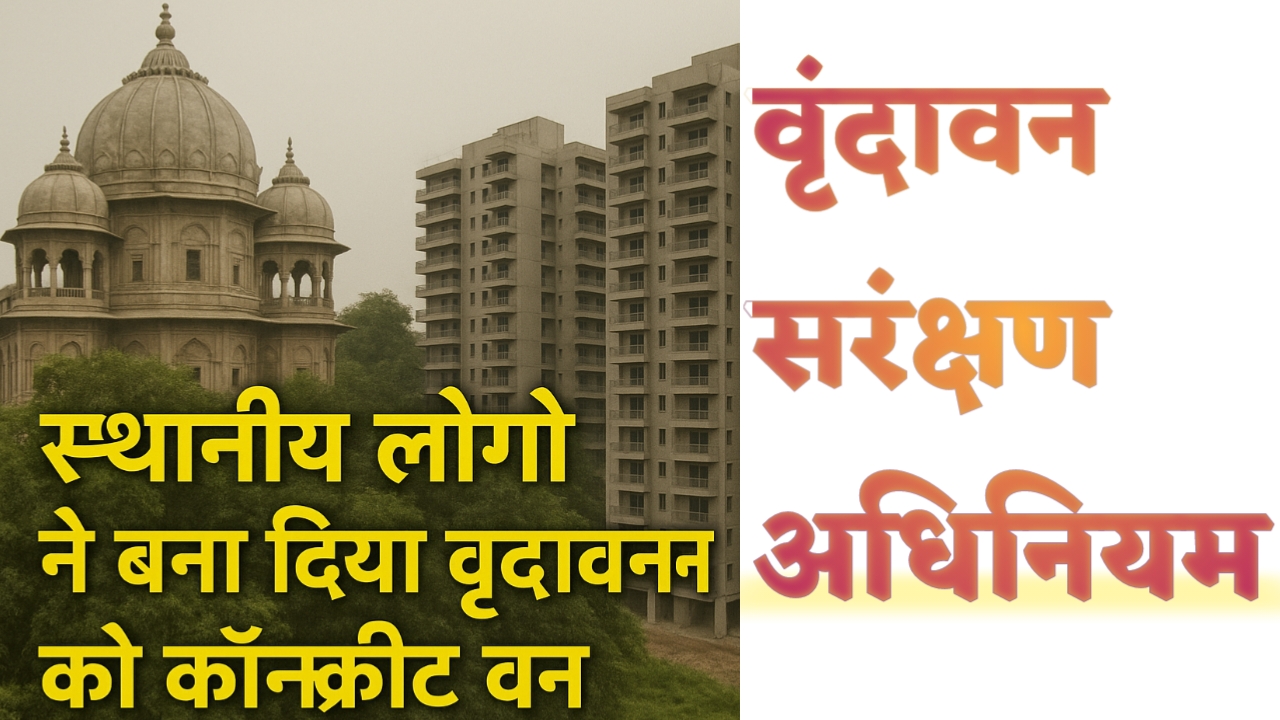
Vrindavan Corridor 2025: वृंदावन सरंक्षण अधिनियम के समर्थन में करोड़ों भक्त! जल्द मिलेगी खुशखबरी

📰 वृंदावन (मथुरा)
पिछले करीब 2 माह से उत्तर प्रदेश के मशहूर बांके बिहारी मंदिर से जुड़े बांके बिहारी कॉरिडोर के विरोध में स्थानीय बृजवासियों ने जोरदार प्रदर्शन कर रहे हैं। अब बात केवल कॉरिडोर तक सीमित नहीं रही, क्योंकि भारत सरकार कभी भी वृंदावन संरक्षण अधिनियम (Vrindavan Sanrakshan Adhiniyam) लागू कर सकती है, क्योंकि सरकार को साफ़ दिखाई दे रहा है कि वनवासियों ने वन पर अतिक्रमण कर लिया है।

बांके बिहारी कॉरिडोर प्रोजेक्ट क्यों लाया गया था?

बांके बिहारी मंदिर में हर साल लाखों श्रद्धालु दर्शन के लिए आते हैं। आपको बता दें भक्तों की भीड़ में काफी समय से दम घुटने से मृत्यु भी हो चुकी है। और प्रतिदिन सैकड़ों भक्तों से मंदिर परिसर में गोस्वामी मार पीट भी कर रहे हैं, जिसे देखकर देशवासियों में बृजवासियों के प्रति भयंकर विरोध हैं। इस भीड़ को नियंत्रित करने और दर्शन को “स्मार्ट” बनाने के उद्देश्य से सरकार ने बांके बिहारी कॉरिडोर योजना बनाई थी। इसमें मंदिर के आसपास की सड़कों और भवनों को हटाकर एक भव्य कॉरिडोर बनाया जाना था। परंतु इस प्रोजेक्ट के विरोध में बृजवासी प्रदर्शन कर रहे हैं। गोस्वामी पारिकरो ने सरकार को धमकाते हुए कहा कि भगवान बांके बिहारी के विग्रह को वृंदावन से कहीं दूर ले जायेंगे। बृजवासी मानते हैं कि बांके बिहारी, उनका लाला है । वे किसी को दर्शन नहीं कराये या नहीं, ये उनकी सम्पत्ति है। वे कह रहे है कि कोरिडोर में बांके बिहारी को विराजमान नहीं करेंगे।

वैसे आज वृंदावन को बृजवासियों ने धंधा वन बना दिया है। पेड़ों को काट कर लक्जरी होटल बना डाला। हजारों समितियों और NGO के संचालन सिर्फ धन कमाने के लिए किया जा रहा है। यहां तक कि शराब और मीट भी खाया पिया जा रहा है। लेकिन बृजवासियों ने उल्टे भारत सरकार को मूर्ख बनाने का काम किया है। स्थानीय लोग बोल रहे हैं कि यह योजना वृंदावन की परंपरागत गलियों, वृक्षों और संस्कृति को नष्ट कर सकती थी। इसलिए खिलाफ ब्रजवासियों और संतों ने कड़ा विरोध किया। जबकि सच्चाई कुछ और ही है।

अब वृंदावन संरक्षण अधिनियम पर नजर

अब जो सबसे बड़ी चिंता की बात है वह है “वृंदावन संरक्षण अधिनियम”। इस अधिनियम के तहत वृंदावन को एक संरक्षित धार्मिक और पर्यावरणीय क्षेत्र घोषित किया जा सकता है। हालांकि सरकार ने इस पर अभी तक कोई विशेष निर्देश नहीं दिए हैं। क्योंकि वृंदावन के इतिहास में भी वहां एक विशेष प्रकार के वृक्ष थे , जिसे वृंदा के नाम से जाना जाता है। जिसे संरक्षण का दर्जा नहीं मिलने के कारण स्थानीय वनवासियों और बृजवासियों ने देखते ही देखते नष्ट-भ्रष्ट कर दिया। धन के भूखे-प्यासे वनवासी, प्रिया प्रियतम के निज वन को खा गये। आज सरकार साफ़-साफ़ देख रहीं हैं कि वनवासियों ने वन पर अतिक्रमण कर लिया है। वृंदावन सरंक्षण अधिनियम के तहत निम्नलिखित नियम बन सकते हैं:-

  • धंधा वन के बृजवासियों या वनवासियों की जमीन और संपत्ति पर प्रतिबंध लग सकता है
  • निर्माण कार्य, व्यापार, और आवाजाही पर पूरी तरह रोक लग सकती है
  • अतिक्रमणकारी मुआवजे के हकदार नहीं है, फिर भी सरकार सुनरख या छठीकरा साइड फ्लैट दे रही है
  • पूरे वृंदावन में वापस वृन्दा वन स्थापित किया जा सकता है।
  • मंदिरों की जगह पेड़ों के कुंज बनायें जा सकते हैं
  • वन में दुकानों का क्या काम, व्यापारी करण पर पूरी तरह बैन लग सकते हैं
  • गुरु द्वारे की तर्ज पर प्लास्टिक, जूते चप्पल, वाहन, गुटखा पान मसाला, शराबियों इत्यादि पर पूरी तरह बैन लग सकता है
  • शौचालय इत्यादि की व्यवस्था वन में उपलब्ध हो सकती है
  • भक्तों या संतों के ठहरने के लिए वृंदावन से बाहर छत की व्यवस्था हो सकती है
  • रात या दिन में जब चाहे, भक्तों को भजन, नाम जप या भक्ति के लिए पूरी छुट मिल सकती है
  • NGO की आड़ में हजारों होटलों का संचालन किया जा रहा है, उन्हें बैन किया जा सकता है
  • वृंदावन के सभी मंदिरों के संचालन के लिए एक विशेष प्रकार की समिति बनाई जा सकती है
  • भक्तों के लिए प्रतिदिन लड्डू प्रसाद और भोजन की व्यवस्था हो सकती है
  • सभी कुटिया और आश्रमों पर बैन लग सकते हैं जिन्हें सिर्फ वृंदावन से बाहर बनाने की अनुमति हो सकती है
  • मंदिर सेवादारों की सेवा व्यवस्था, दान इत्यादि एक ही समिति के अंतर्गत हो सकता है।

वृन्दावन को कांक्रीट वन बनाने में अंग्रेजों के कुछ वन विनाशक अधिनियम भी सहयोगी बने है। जिस कारण आज वृंदावन को धंधा वन दिया गया है। काश! आज भारत में मोदीजी के होते हुए ये वृंदावन बच जाए। और फिर से सनातन संस्कृति का शंखनाद और ज्ञान केंद्र की स्थापना हो जायें। परंतु आप देख रहे हैं कि कुछ लोग, तुच्छ मानसिकता को पूरी करने के लिए सनातन धर्म के भक्ति केंद्रों को बर्बाद करने के कार्य में लगे हुए हैं। वृंदावन को कॉन्क्रीट वन बना दिया और पूरी तरह से धंधा वन बना दिया गया है।

🌳 वृंदावन के वृक्ष और वन क्यों हैं महत्वपूर्ण?

वृंदावन केवल एक तीर्थ स्थल नहीं, बल्कि श्रीकृष्ण की लीलाओं की भूमि है। यहां के वृक्ष, विशेषकर वृंदा वृक्ष (Tulsi की प्राचीन प्रजाति), कदंब, पीपल, और बेल वृक्ष सनातन संस्कृति का अहम हिस्सा हैं।

  • श्रीमद्भागवत में भी वृंदावन के वनों का वर्णन है
  • वृंदा देवी स्वयं वृक्ष रूप में निवास करती हैं
  • यह वन क्षेत्र दिव्य ऊर्जा, जैव विविधता और भक्तिभाव का केंद्र है, जिनके नीचे भक्तों को प्रिया प्रीतम के दर्शन होते हैं।

सनातन संस्कृति और वृंदावन का महत्व

  • वृंदावन 12 वन (द्वादश वन) का क्षेत्र है, जहाँ श्रीकृष्ण ने रासलीला, माखन चोरी, और गोपियों संग लीला की थी
  • यह क्षेत्र सनातन धर्म का एक जीवंत प्रतीक है
  • किसी भी प्रकार का आधुनिक निर्माण, कॉरिडोर या सरकारी योजना यहां की आध्यात्मिकता को नुकसान पहुंचा सकती है, परंतु इससे पहले ही स्थानीय लोगों ने वन को नष्ट-भ्रष्ट कर दिया है। पूरा धंधा बना दिया है।

निष्कर्ष (Conclusion)

बांके बिहारी कॉरिडोर की योजना पर भले ही विरोध प्रदर्शन हो रहे हैं, लेकिन अब वृंदावन संरक्षण अधिनियम एक नई उम्मीद की किरण है। यह कानून किसी भी समय लागू हो सकता है क्योंकि इस मांग को लेकर पिछले काफी सालों से भक्तों ने प्रदर्शन भी किया हैं। हमें वृंदावन की प्राकृतिक विरासत, धार्मिक गरिमा और स्थानीय संस्कृति को मिलकर बचाना होगा। अब देखना होगा कि भारत सरकार कैसे वृंदावन की समस्या को हल करेंगी।

Digital Suchna Kendra: SUCHNAPORTAL.COM

SUCHNAPORTAL.COM (Digital Suchna Kendra) एक विश्वसनीय ऑनलाइन प्लेटफॉर्म है, जो विभिन्न विषयों और क्षेत्रों पर निःशुल्क ट्यूटोरियल प्रदान करता है। हमारा उद्देश्य हर भारतीय को आसान (हिंदी, तमिल , मराठी, गुजराती, पंजाबी और अंग्रेजी ) भाषाओं में जानकारी देना है।

यहां कुछ e Governance सेवाओं के नाम और इनके उपयोग के बारे में विस्तृत जानकारी आसान भाषा में दी गई है :-

यहां आधार कार्ड (Aadhaar), पैन कार्ड (PAN Card), वोटर आईडी (Voter ID), राशन कार्ड (Ration Card), प्रधानमंत्री आवास योजना (PMAY), सोलर योजना (Solar Yojana), जीएसटी रजिस्ट्रेशन (GST Registration), कंपनी रजिस्ट्रेशन (MCA Company Registration), और अन्य गैर सरकारी और सरकारी योजनाओं की आवेदन प्रक्रिया से लेकर लाभ प्राप्त करने तक की पूरी जानकारी हिंदी में प्रकाशित कर रहे हैं। Digital India mission के तहत भारत में कई ई-गवर्नेंस और डिजिटल सेवाएं शुरू की हैं, जो नागरिकों के लिए सुविधाजनक और पारदर्शी हैं। नीचे उन सभी सेवाओं का संक्षिप्त विवरण दिया गया है –


नागरिक केंद्रित सेवाएं (G2C Services) Digital Suchna Kendra

नागरिक केंद्रित सेवाएं (G2C – Government to Citizen Services) भारत में डिजिटल इंडिया (Digital India) के तहत ई-गवर्नेंस (e-Governance) का हिस्सा हैं, जो नागरिकों को सरकारी सुविधाएं ऑनलाइन प्रदान करती हैं। ये सेवाएं पारदर्शी, सुलभ, और समय-बचत वाली हैं, जो कॉमन सर्विस सेंटर्स (CSC) और पोर्टल्स जैसे e-District के माध्यम से उपलब्ध हैं। नीचे G2C Services की पूरी लिस्ट अपडेट कर दी है –

Digital Suchna Kendra Tutorials ✓

सेवा का नाम (Service Name) विवरण (Description)
आय प्रमाण पत्र (Income Certificate)परिवार की वार्षिक आय सत्यापित करने वाला दस्तावेज।
जाति प्रमाण पत्र (Caste Certificate)सरकारी योजनाओं के लिए जाति सत्यापन।
अधिवास प्रमाण पत्र (Domicile Certificate)स्थायी निवास का प्रमाण पत्र।
जन्म प्रमाण पत्र (Birth Certificate)नवजात शिशु का आधिकारिक जन्म रिकॉर्ड।
मृत्यु प्रमाण पत्र (Death Certificate)मृत्यु का सरकारी रिकॉर्ड।
राशन कार्ड (Ration Card)सब्सिडी पर खाद्यान्न प्राप्त करने का दस्तावेज।
आधार कार्ड (Aadhaar Card)12 अंकों की विशिष्ट पहचान संख्या।
पैन कार्ड (PAN Card)आयकर और वित्तीय लेनदेन के लिए पहचान।
वोटर आईडी (Voter ID)मतदान के लिए पहचान पत्र।
ड्राइविंग लाइसेंस (Driving License)वाहन चलाने की अनुमति।
पासपोर्ट (Passport)अंतरराष्ट्रीय यात्रा के लिए दस्तावेज।
बिजली बिल भुगतान (Electricity Bill Payment)ऑनलाइन बिजली बिल जमा करने की सुविधा।
पानी बिल भुगतान (Water Bill Payment)जल आपूर्ति बिल का डिजिटल भुगतान।
गैस बिल भुगतान (Gas Bill Payment)रसोई गैस बिल का ऑनलाइन भुगतान।
मोबाइल रिचार्ज (Mobile Recharge)प्रीपेड मोबाइल रिचार्ज सेवा।
डीटीएच रिचार्ज (DTH Recharge)टीवी प्रसारण के लिए रिचार्ज।
भूमि पंजीकरण (Land Registration)संपत्ति का डिजिटल पंजीकरण।
भूमि रिकॉर्ड (Land Records)खसरा-खतौनी ऑनलाइन सत्यापन।
संपत्ति कर भुगतान (Property Tax Payment)नगर निगम कर का भुगतान।
सामाजिक कल्याण पेंशन (Social Welfare Pension)वरिष्ठ नागरिकों और विधवाओं के लिए पेंशन।
RTI आवेदन (RTI Application)सूचना का अधिकार के तहत आवेदन।
रोजगार पंजीकरण (Employment Registration)सरकारी नौकरियों के लिए पंजीकरण।
विधवा पेंशन (Widow Pension)विधवाओं के लिए मासिक वित्तीय सहायता।
विकलांगता प्रमाण पत्र (Disability Certificate)दिव्यांग व्यक्तियों के लिए सरकारी लाभ।
दहेज पीड़ित सहायता (Dowry Victim Assistance)दहेज उत्पीड़न पीड़ितों को सहायता।
विधवा पुनर्विवाह (Widow Remarriage)पुनर्विवाह के लिए प्रोत्साहन राशि।
चिकित्सा प्रमाण पत्र (Medical Certificate)स्वास्थ्य जांच का आधिकारिक दस्तावेज।
छात्रवृत्ति आवेदन (Scholarship Application)मेधावी और जरूरतमंद छात्रों के लिए।
पीएम उज्ज्वला योजना (PM Ujjwala Yojana)गरीब परिवारों को मुफ्त गैस कनेक्शन।
पीएम जनऔषधि केंद्र (PM Jan Aushadhi Kendra)सस्ती जेनेरिक दवाएं उपलब्ध।
श्रम योगी मानधन (Shram Yogi Maandhan)असंगठित क्षेत्र के श्रमिकों के लिए पेंशन।
ई-एफआईआर (e-FIR)ऑनलाइन पुलिस शिकायत दर्ज करने की सुविधा।
किरायेदार सत्यापन (Tenant Verification)किरायेदार की पृष्ठभूमि जांच।
चरित्र प्रमाण पत्र (Character Certificate)पुलिस द्वारा चरित्र सत्यापन।
जुलूस अनुरोध (Procession Request)सार्वजनिक जुलूस के लिए अनुमति।
हड़ताल अनुरोध (Strike Request)विरोध प्रदर्शन की अनुमति।
इवेंट अनुरोध (Event Request)सामाजिक आयोजनों के लिए अनुमति।
गुमशुदा व्यक्ति (Missing Person)लापता व्यक्तियों की जानकारी दर्ज करें।
चोरी वाहन शिकायत (Stolen Vehicle Complaint)चोरी हुए वाहनों की ऑनलाइन शिकायत।
प्राथमिकी स्थिति (FIR Status)FIR की स्थिति ऑनलाइन ट्रैक करें।
साइबर क्राइम शिकायत (Cyber Crime Complaint)ऑनलाइन धोखाधड़ी की शिकायत।
हवाई यात्रा शिकायत (Aviation Complaint)उड्डयन सेवाओं से संबंधित शिकायत।
विदेशी मतदाता पंजीकरण (NRI Voter Registration)NRI मतदाताओं के लिए पंजीकरण।
किसान सम्मान निधि (PM Kisan Samman Nidhi)किसानों को वार्षिक वित्तीय सहायता।
मछली पालन योजना (Fisheries Scheme)मछुआरों के लिए सब्सिडी और प्रशिक्षण।
काजू खेती योजना (Cashew Farming Scheme)काजू उत्पादन के लिए वित्तीय सहायता।
प्रथम सहायता प्रशिक्षण (First Aid Training)आपातकालीन चिकित्सा प्रशिक्षण।
सूखा प्रबंधन (Drought Management)सूखा प्रभावित क्षेत्रों के लिए राहत।
बाढ़ राहत (Flood Relief)बाढ़ पीड़ितों के लिए वित्तीय सहायता।
वरिष्ठ नागरिक बचत (Senior Citizen Savings)8.2% ब्याज दर पर निवेश योजना।
विवाह पंजीकरण (Marriage Registration)विवाह का आधिकारिक पंजीकरण।
तलाक पंजीकरण (Divorce Registration)तलाक का कानूनी रिकॉर्ड।
नाम परिवर्तन (Name Change)कानूनी रूप से नाम बदलने की प्रक्रिया।
वाहन पंजीकरण (Vehicle Registration)नए वाहन का पंजीकरण।
वाहन कर भुगतान (Vehicle Tax Payment)वाहन कर का ऑनलाइन भुगतान।
प्रदूषण नियंत्रण प्रमाण पत्र (Pollution Control Certificate)वाहन उत्सर्जन जांच प्रमाण पत्र।
बीमा नवीनीकरण (Insurance Renewal)वाहन बीमा का ऑनलाइन नवीनीकरण।
बिजली कनेक्शन (Electricity Connection)नया बिजली कनेक्शन प्राप्त करें।
पानी कनेक्शन (Water Connection)नया जल आपूर्ति कनेक्शन।
गैस कनेक्शन (Gas Connection)नया रसोई गैस कनेक्शन।
आयुष्मान भारत कार्ड (Ayushman Bharat Card)मुफ्त स्वास्थ्य बीमा के लिए पंजीकरण।
स्वास्थ्य बीमा दावा (Health Insurance Claim)स्वास्थ्य बीमा दावों की ऑनलाइन प्रक्रिया।
टीकाकरण पंजीकरण (Vaccination Registration)कोविड-19 या अन्य टीकों के लिए पंजीकरण।
मातृत्व लाभ योजना (Maternity Benefit Scheme)गर्भवती महिलाओं के लिए वित्तीय सहायता।
बाल विकास योजना (Child Development Scheme)बच्चों के पोषण और शिक्षा के लिए सहायता।
कन्या सुमंगला योजना (Kanya Sumangala Yojana)बालिकाओं के लिए वित्तीय सहायता।
बेटी बचाओ बेटी पढ़ाओ (Beti Bachao Beti Padhao)बालिकाओं की शिक्षा और सुरक्षा के लिए।
पीएम स्वनिधि योजना (PM SVANidhi)स्ट्रीट वेंडर्स के लिए ऋण सहायता।
मुद्रा लोन (Mudra Loan)छोटे व्यवसायों के लिए ऋण।
स्टार्टअप इंडिया (Startup India)स्टार्टअप्स के लिए पंजीकरण और सहायता।
स्किल इंडिया (Skill India)कौशल विकास प्रशिक्षण के लिए पंजीकरण।
पीएम रोजगार योजना (PM Employment Scheme)युवाओं के लिए रोजगार अवसर।
ग्रामीण रोजगार गारंटी (MGNREGA) quedarग्रामीण क्षेत्रों में 100 दिन का रोजगार।
आवास योजना पंजीकरण (PMAY Registration)गरीबों के लिए मकान निर्माण सहायता।
स्वच्छ भारत मिशन (Swachh Bharat Mission)शौचालय निर्माण के लिए सहायता।
सौर ऊर्जा सब्सिडी (Solar Energy Subsidy)सौर पैनल स्थापना के लिए सहायता।
बिजली मीटर आवेदन (Electricity Meter Application)नए बिजली मीटर के लिए आवेदन।
भूमि विवाद शिकायत (Land Dispute Complaint)भूमि विवादों की ऑनलाइन शिकायत।
ग्राम पंचायत सेवाएं (Gram Panchayat Services)ग्रामीण सेवाओं के लिए आवेदन।
पशुधन बीमा (Livestock Insurance)पशुओं के लिए बीमा योजना।
फसल बीमा (Crop Insurance)फसल नुकसान के लिए बीमा।
खाद्य लाइसेंस (Food License)खाद्य व्यवसाय के लिए लाइसेंस।
दुकान लाइसेंस (Shop License)दुकान संचालन के लिए लाइसेंस।
व्यापार पंजीकरण (Trade Registration)व्यवसाय शुरू करने के लिए पंजीकरण।
जीएसटी पंजीकरण (GST Registration)वस्तु और सेवा कर पंजीकरण।
आयकर रिटर्न (Income Tax Return)ऑनलाइन आयकर रिटर्न दाखिल करें।
संपत्ति मूल्यांकन (Property Valuation)संपत्ति के मूल्य का आधिकारिक मूल्यांकन।
जल निकासी शिकायत (Drainage Complaint)जल निकासी समस्याओं की शिकायत।
सड़क मरम्मत शिकायत (Road Repair Complaint)क्षतिग्रस्त सड़कों की शिकायत।
स्ट्रीट लाइट शिकायत (Street Light Complaint)खराब स्ट्रीट लाइट की शिकायत।
कचरा प्रबंधन (Waste Management)कचरा निपटान सेवाओं के लिए आवेदन।
वृक्षारोपण योजना (Tree Plantation Scheme)पेड़ लगाने के लिए सहायता।
जल संरक्षण योजना (Water Conservation Scheme)जल संरक्षण के लिए सहायता।
जैविक खेती योजना (Organic Farming Scheme)जैविक खेती के लिए सब्सिडी।
डेयरी विकास योजना (Dairy Development Scheme)डेयरी व्यवसाय के लिए सहायता।
मुर्गी पालन योजना (Poultry Farming Scheme)मुर्गी पालन के लिए ऋण और प्रशिक्षण।
बकरी पालन योजना (Goat Farming Scheme)बकरी पालन के लिए सहायता।
मधुमक्खी पालन योजना (Beekeeping Scheme)शहद उत्पादन के लिए सहायता।
मत्स्य पालन लाइसेंस (Fisheries License)मछली पालन के लिए लाइसेंस।
खनन लाइसेंस (Mining License)खनन गतिविधियों के लिए अनुमति।
वन संरक्षण योजना (Forest Conservation Scheme)वन संरक्षण के लिए सहायता।
वन्यजीव शिकायत (Wildlife Complaint)वन्यजीव खतरे की शिकायत।
पर्यावरण मंजूरी (Environmental Clearance)पर्यावरणीय परियोजनाओं के लिए मंजूरी।
प्रदूषण शिकायत (Pollution Complaint)वायु, जल, या ध्वनि प्रदूषण की शिकायत।
स्वास्थ्य शिविर पंजीकरण (Health Camp Registration)मुफ्त स्वास्थ्य शिविरों के लिए पंजीकरण।
रक्त दान पंजीकरण (Blood Donation Registration)रक्त दान शिविरों के लिए पंजीकरण।
नेत्र जांच शिविर (Eye Checkup Camp)मुफ्त नेत्र जांच के लिए पंजीकरण।
कैंसर जांच (Cancer Screening)कैंसर जांच के लिए पंजीकरण।
टीबी जांच (TB Screening)तपेदिक जांच के लिए पंजीकरण।
एचआईवी जांच (HIV Testing)एचआईवी जांच के लिए पंजीकरण।
डायबिटीज जांच (Diabetes Screening)मधुमेह जांच के लिए पंजीकरण।
ब्लड प्रेशर जांच (BP Screening)रक्तचाप जांच के लिए पंजीकरण।
गर्भावस्था पंजीकरण (Pregnancy Registration)गर्भवती महिलाओं के लिए स्वास्थ्य सेवाएं।
बाल टीकाकरण (Child Vaccination)बच्चों के लिए टीकाकरण सेवाएं।
परिवार नियोजन (Family Planning)परिवार नियोजन सेवाओं के लिए पंजीकरण।
वृद्धावस्था स्वास्थ्य (Senior Healthcare)वरिष्ठ नागरिकों के लिए स्वास्थ्य सेवाएं।
मानसिक स्वास्थ्य सहायता (Mental Health Support)Suchna Portalमानसिक स्वास्थ्य के लिए परामर्श।
नशा मुक्ति केंद्र (De-addiction Center)नशा छोड़ने के लिए सहायता।
आपातकालीन चिकित्सा (Emergency Medical)आपातकालीन चिकित्सा सेवाओं के लिए पंजीकरण।
अस्पताल पंजीकरण (Hospital Registration)सरकारी अस्पतालों में पंजीकरण।
दवा वितरण (Medicine Distribution)मुफ्त दवाओं के लिए पंजीकरण।
स्कूल प्रवेश (School Admission)सरकारी स्कूलों में प्रवेश के लिए आवेदन।
कॉलेज प्रवेश (College Admission)सरकारी कॉलेजों में प्रवेश के लिए आवेदन।
छात्रावास आवेदन (Hostel Application)सरकारी छात्रावासों के लिए आवेदन।
खेल छात्रवृत्ति (Sports Scholarship)खेल प्रतिभाओं के लिए छात्रवृत्ति।
सांस्कृतिक छात्रवृत्ति (Cultural Scholarship)सांस्कृतिक गतिविधियों के लिए छात्रवृत्ति।
तकनीकी प्रशिक्षण (Technical Training)तकनीकी कौशल के लिए प्रशिक्षण।
शिक्षक पंजीकरण (Teacher Registration)सरकारी स्कूलों में शिक्षक भर्ती।
स्कूल बस सेवा (School Bus Service)स्कूल बस सेवाओं के लिए आवेदन।
मिड-डे मील (Mid-Day Meal)स्कूलों में मुफ्त भोजन के लिए पंजीकरण।
पुस्तकालय पंजीकरण (Library Registration)सरकारी पुस्तकालयों में सदस्यता।
डिजिटल लाइब्रेरी (Digital Library)ऑनलाइन पुस्तकों के लिए पंजीकरण।
वाई-फाई कनेक्शन (Wi-Fi Connection)सार्वजनिक वाई-फाई के लिए पंजीकरण।
डाक सेवाएं (Postal Services)डाक सेवाओं के लिए ऑनलाइन आवेदन।
डाक बचत खाता (Post Office Savings)डाकघर बचत खाता खोलें।
डाक बीमा (Postal Insurance)डाकघर बीमा योजना के लिए पंजीकरण।
रेलवे टिकट बुकिंग (Railway Ticket Booking)ऑनलाइन रेलवे टिकट बुकिंग।
बस टिकट बुकिंग (Bus Ticket Booking)सरकारी बसों के लिए टिकट बुकिंग।
हवाई टिकट बुकिंग (Flight Booking)सरकारी उड्डयन सेवाओं के लिए बुकिंग।
पर्यटक वीजा (Tourist Visa)भारत में पर्यटन के लिए वीजा।
तीर्थ यात्रा सहायता (Pilgrimage Assistance)तीर्थ यात्रा के लिए सहायता।
खेल आयोजन पंजीकरण (Sports Event Registration)सरकारी खेल आयोजनों के लिए पंजीकरण।
सांस्कृतिक आयोजन (Cultural Event)सांस्कृतिक आयोजनों के लिए पंजीकरण।
सामुदायिक केंद्र (Community Center)सामुदायिक केंद्र बुकिंग।
सार्वजनिक पार्क (Public Park)पार्क उपयोग के लिए अनुमति।
वाहन पार्किंग (Vehicle Parking)सरकारी पार्किंग के लिए पंजीकरण।
साइकिल शेयरिंग (Cycle Sharing)साइकिल शेयरिंग सेवाओं के लिए पंजीकरण।
इलेक्ट्रिक वाहन सब्सिडी (EV Subsidy)इलेक्ट्रिक वाहनों के लिए सहायता।
स्मार्ट सिटी सेवाएं (Smart City Services)स्मार्ट सिटी परियोजनाओं के लिए सेवाएं।
नगर निगम शिकायत (Municipal Complaint)नगर निगम सेवाओं की शिकायत।
अग्निशमन सेवाएं (Fire Services)अग्निशमन सेवाओं के लिए आवेदन।
आपदा प्रबंधन (Disaster Management)आपदा राहत के लिए पंजीकरण।
भूकंप राहत (Earthquake Relief)भूकंप पीड़ितों के लिए सहायता।
चक्रवात राहत (Cyclone Relief)चक्रवात पीड़ितों के लिए सहायता।
भूस्खलन राहत (Landslide Relief)भूस्खलन पीड़ितों के लिए सहायता।
आपातकालीन हेल्पलाइन (Emergency Helpline)आपातकालीन हेल्पलाइन सेवाओं के लिए पंजीकरण।
पुलिस सहायता (Police Assistance)पुलिस सहायता के लिए ऑनलाइन आवेदन।
महिला हेल्पलाइन (Women Helpline) Suchna Portalमहिलाओं के लिए आपातकालीन सहायता।
बाल हेल्पलाइन (Child Helpline)बच्चों के लिए आपातकालीन सहायता।
वरिष्ठ नागरिक हेल्पलाइन (Senior Citizen Helpline)वरिष्ठ नागरिकों के लिए सहायता।
कानूनी सहायता (Legal Aid)मुफ्त कानूनी सहायता के लिए आवेदन।
उपभोक्ता शिकायत (Consumer Complaint)उपभोक्ता अधिकारों की शिकायत।
खाद्य सुरक्षा शिकायत (Food Safety Complaint)खाद्य गुणवत्ता की शिकायत।
श्रम शिकायत (Labor Complaint)श्रमिकों के अधिकारों की शिकायत।
पेंशन शिकायत (Pension Complaint)पेंशन वितरण की शिकायत।
बैंकिंग शिकायत (Banking Complaint)बैंकिंग सेवाओं की शिकायत।
बीमा शिकायत (Insurance Complaint)बीमा सेवाओं की शिकायत।
रेलवे शिकायत (Railway Complaint)रेलवे सेवाओं की शिकायत।
डाक शिकायत (Postal Complaint)डाक सेवाओं की शिकायत।
टेलीकॉम शिकायत (Telecom Complaint)टेलीकॉम सेवाओं की शिकायत।
बिजली शिकायत (Electricity Complaint)बिजली सेवाओं की शिकायत।
पानी शिकायत (Water Complaint)जल आपूर्ति सेवाओं की शिकायत।
गैस शिकायत (Gas Complaint)गैस आपूर्ति सेवाओं की शिकायत।
सड़क सुरक्षा शिकायत (Road Safety Complaint)सड़क सुरक्षा मुद्दों की शिकायत।
राशन वितरण शिकायत (Ration Distribution Complaint)राशन वितरण की शिकायत।
सरकारी योजना शिकायत (Scheme Complaint)सरकारी योजनाओं की शिकायत।
भ्रष्टाचार शिकायत (Corruption Complaint) Suchna Portalसरकारी भ्रष्टाचार की शिकायत।

अन्य

  • आधार सेवाएं: आधार कार्ड डाउनलोड, अपडेट, लिंकिंग (बैंक, मोबाइल, डिजिलॉकर)।
  • प्रणाम पत्र: आय, जाति, निवास, जन्म, मृत्यु प्रमाण पत्र।
  • पैन कार्ड: ऑनलाइन आवेदन, सुधार, स्टेटस चेक।
  • वोटर आईडी: ऑनलाइन आवेदन, लिस्ट चेक, अपडेट।
  • राशन कार्ड: आवेदन, स्टेटस, अपडेट।
  • पासपोर्ट सेवा: आवेदन, अपॉइंटमेंट, टाटकाल सेवा।
  • ड्राइविंग लाइसेंस: आवेदन, नवीनीकरण, स्टेटस।
  • स्वच्छ भारत मिशन: शौचालय निर्माण आवेदन, सब्सिडी।

वित्तीय और कर सेवाएं

  • आयकर पोर्टल: आयकर रिटर्न, रिफंड, PAN-Aadhaar लिंकिंग।
  • जीएसटी पोर्टल: रजिस्ट्रेशन, रिटर्न फाइलिंग, टैक्स भुगतान।
  • प्रधानमंत्री जन धन योजना: डिजिटल खाता, DBT।
  • राष्ट्रीय पेंशन प्रणाली (NPS): खाता खोलना, योगदान ट्रैकिंग।
  • भारत बिल पेमेंट सिस्टम (BBPS): बिजली, पानी, गैस बिल भुगतान।

शिक्षा और छात्रवृत्ति सेवाएं

  • नेशनल स्कॉलरशिप पोर्टल (NSP): स्कॉलरशिप आवेदन, स्टेटस, DBT।
  • ई-लर्निंग पोर्टल्स: SWAYAM, DIKSHA (ऑनलाइन कोर्स, शिक्षक प्रशिक्षण)।
  • CBSE/राज्य बोर्ड: ऑनलाइन रिजल्ट, मार्कशीट डाउनलोड।

स्वास्थ्य सेवाएं

  • ई-हॉस्पिटल: OPD बुकिंग, अस्पताल रिकॉर्ड।
  • आयुष्मान भारत: स्वास्थ्य कार्ड, अस्पताल खोज, बीमा क्लेम।
  • CoWIN पोर्टल: टीकाकरण बुकिंग, सर्टिफिकेट डाउनलोड।
  • टेलीमेडिसिन: eSanjeevani (ऑनलाइन डॉक्टर परामर्श)।

कृषि और ग्रामीण सेवाएं

  • ई-नाम (e-NAM): फसलों की ऑनलाइन बिक्री, मूल्य पारदर्शिता।
  • PM Kisan Samman Nidhi: किसान रजिस्ट्रेशन, DBT स्टेटस।
  • Kisan e-Mitra: AI-आधारित किसान सहायता चैटबॉट।

श्रम और रोजगार सेवाएं

  • ई-श्रम पोर्टल: असंगठित श्रमिक रजिस्ट्रेशन, ई-श्रम कार्ड।
  • EPFO सेवाएं: PF बैलेंस चेक, पासबुक, क्लेम।
  • NCS पोर्टल: नौकरी खोज, रजिस्ट्रेशन।

न्यायिक और कानूनी सेवाएं

  • ई-कोर्ट सेवाएं: केस स्टेटस, सुनवाई तिथि, दस्तावेज।
  • टेली-लॉ: मुफ्त कानूनी सलाह।
  • भूमि रिकॉर्ड: भूलेख, खसरा, खतौनी ऑनलाइन।

इन्फ्रास्ट्रक्चर और कनेक्टिविटी

  • भारत नेट: ग्रामीण क्षेत्रों में हाई-स्पीड इंटरनेट।
  • Wi-Fi हॉटस्पॉट्स: PM-WANI योजना के तहत मुफ्त Wi-Fi।

उद्यम और व्यवसाय सेवाएं

  • ई-बिज: व्यवसाय रजिस्ट्रेशन, लाइसेंस, परमिट।
  • UDYAM पोर्टल: MSME रजिस्ट्रेशन।
  • GeM पोर्टल: सरकारी खरीद के लिए ऑनलाइन मार्केटप्लेस।

सामाजिक कल्याण और अन्य सेवाएं

  • जन आधार योजना (राजस्थान): परिवार पहचान, DBT।
  • महिला ई-हाट: महिला उद्यमियों के लिए ऑनलाइन मार्केट।
  • RTI ऑनलाइन: सूचना का अधिकार आवेदन।

कॉमन सर्विस सेंटर्स (CSC) सेवाएं

  • CSC के माध्यम से 300+ सेवाएं उपलब्ध हैं, जैसे:
  • आधार, पैन, राशन कार्ड आवेदन।
  • बिल भुगतान, बीमा, टेलीमेडिसिन।
  • शिक्षा (ऑनलाइन कोर्स), डिजिटल साक्षरता।

UMANG ऐप सेवाएं

  • UMANG (Unified Mobile Application for New-age Governance) 1000+ सेवाएं प्रदान करता है, जैसे:
  • EPFO, NPS, PM Kisan, BBPS।
  • पासपोर्ट, आयकर, डिजिलॉकर।
  • स्वास्थ्य, शिक्षा, और कृषि सेवाएं।


SuchnaPortal.com की भूमिका

Digital Suchna Kendra SuchnaPortal.com नागरिकों को सभी विषयों और क्षेत्रों जैसे ई-गवर्नेंस और डिजिटल सेवाओं (जैसे जन आधार, ई-श्रम, आयकर, CSC) की आवेदन प्रक्रिया की गाइड,  सरल और आसान हिंदी और अन्य भारतीय भाषाओं  में प्रदान करता है। 

भारत की 500+ ई-गवर्नेंस और डिजिटल सेवाएं जैसे UMANG, CSC, जन आधार, ई-श्रम की पूरी step by step tutorial – निःशुल्क Digital Suchna Kendra SuchnaPortal.com पर  हिंदी  और अन्य सभी भारतीय भाषाओं में पाएं! 

Privacy Policy

Who we are

Suggested text: Our website address is: http://suchnaportal.com.

Comments

Suggested text: When visitors leave comments on the site we collect the data shown in the comments form, and also the visitor’s IP address and browser user agent string to help spam detection.

An anonymized string created from your email address (also called a hash) may be provided to the Gravatar service to see if you are using it. The Gravatar service privacy policy is available here: https://automattic.com/privacy/. After approval of your comment, your profile picture is visible to the public in the context of your comment.

Media

Suggested text: If you upload images to the website, you should avoid uploading images with embedded location data (EXIF GPS) included. Visitors to the website can download and extract any location data from images on the website.

Cookies

Suggested text: If you leave a comment on our site you may opt-in to saving your name, email address and website in cookies. These are for your convenience so that you do not have to fill in your details again when you leave another comment. These cookies will last for one year.

If you visit our login page, we will set a temporary cookie to determine if your browser accepts cookies. This cookie contains no personal data and is discarded when you close your browser.

When you log in, we will also set up several cookies to save your login information and your screen display choices. Login cookies last for two days, and screen options cookies last for a year. If you select "Remember Me", your login will persist for two weeks. If you log out of your account, the login cookies will be removed.

If you edit or publish an article, an additional cookie will be saved in your browser. This cookie includes no personal data and simply indicates the post ID of the article you just edited. It expires after 1 day.

Embedded content from other websites

Suggested text: Articles on this site may include embedded content (e.g. videos, images, articles, etc.). Embedded content from other websites behaves in the exact same way as if the visitor has visited the other website.

These websites may collect data about you, use cookies, embed additional third-party tracking, and monitor your interaction with that embedded content, including tracking your interaction with the embedded content if you have an account and are logged in to that website.

Who we share your data with

Suggested text: If you request a password reset, your IP address will be included in the reset email.

How long we retain your data

Suggested text: If you leave a comment, the comment and its metadata are retained indefinitely. This is so we can recognize and approve any follow-up comments automatically instead of holding them in a moderation queue.

For users that register on our website (if any), we also store the personal information they provide in their user profile. All users can see, edit, or delete their personal information at any time (except they cannot change their username). Website administrators can also see and edit that information.

What rights you have over your data

Suggested text: If you have an account on this site, or have left comments, you can request to receive an exported file of the personal data we hold about you, including any data you have provided to us. You can also request that we erase any personal data we hold about you. This does not include any data we are obliged to keep for administrative, legal, or security purposes.

Where your data is sent

Suggested text: Visitor comments may be checked through an automated spam detection service.